Chapter I — The Vessel
Install BepInEx 5 (x86)
Before either plugin can whisper to the game, the game needs a mouth to hear them with. BepInEx 5 is that mouth: a small, open-source loader that boots alongside lus.exe and runs any plugin placed in its plugins folder. This chapter installs it correctly on the first try.
Step I: Find the game folder
Everything in this manual happens inside one folder: the game root, where lus.exe lives. The reliable way to open it:
- In your Steam library, right-click Lovecraft's Untold Stories.
- Choose Manage → Browse local files.
Explorer opens the game root. Depending on where your Steam library lives, the path looks like one of these:
; default Steam library
C:\Program Files (x86)\Steam\steamapps\common\Lovecraft's Untold Stories\

; a library on another drive (the machine in the screenshots)
F:\SteamLibrary\steamapps\common\Lovecraft's Untold Stories\
A vanilla copy contains the folders Artbook, lus_Data and Music, plus launcher.exe, lus.exe, UnityPlayer.dll, steam_api.dll and steam_appid.txt. If you see lus.exe, you are in the right place.
Step II: Download BepInEx 5 (win_x86)
Get the loader only from the official source:
On the newest 5.4.x release, expand Assets and download the Windows 32-bit zip — for example BepInEx_win_x86_5.4.23.3.zip, or any newer BepInEx_win_x86_5.4.….zip. Both Stix plugins target BepInEx 5 and are happy on any 5.4 build.
Step III: Extract it into the game root
Open the downloaded zip and extract everything straight into the game root from Step I — the folder that contains lus.exe. When Windows asks about merging folders, allow it. Afterwards, these must sit directly beside lus.exe:
Lovecraft's Untold Stories\
├── BepInEx\              ← the framework (only \core inside, for now)
├── winhttp.dll           ← the proxy that boots it all
├── doorstop_config.ini
├── .doorstop_version
├── changelog.txt         ← BepInEx's changelog, not the game's
├── lus.exe               ← already there
└── launcher.exe, lus_Data\, UnityPlayer.dll, …Step IV: Run the game once, then quit
Launch Lovecraft's Untold Stories from Steam exactly as you always do. Let it reach the main menu, then exit. On this first boot, BepInEx builds its working folders. Open BepInEx\ and you should now see:
BepInEx\
├── cache\
├── config\        ← BepInEx.cfg appears here
├── core\
├── patchers\
├── plugins\       ← the mods go here in Chapters II & III
└── LogOutput.log  ← your proof of life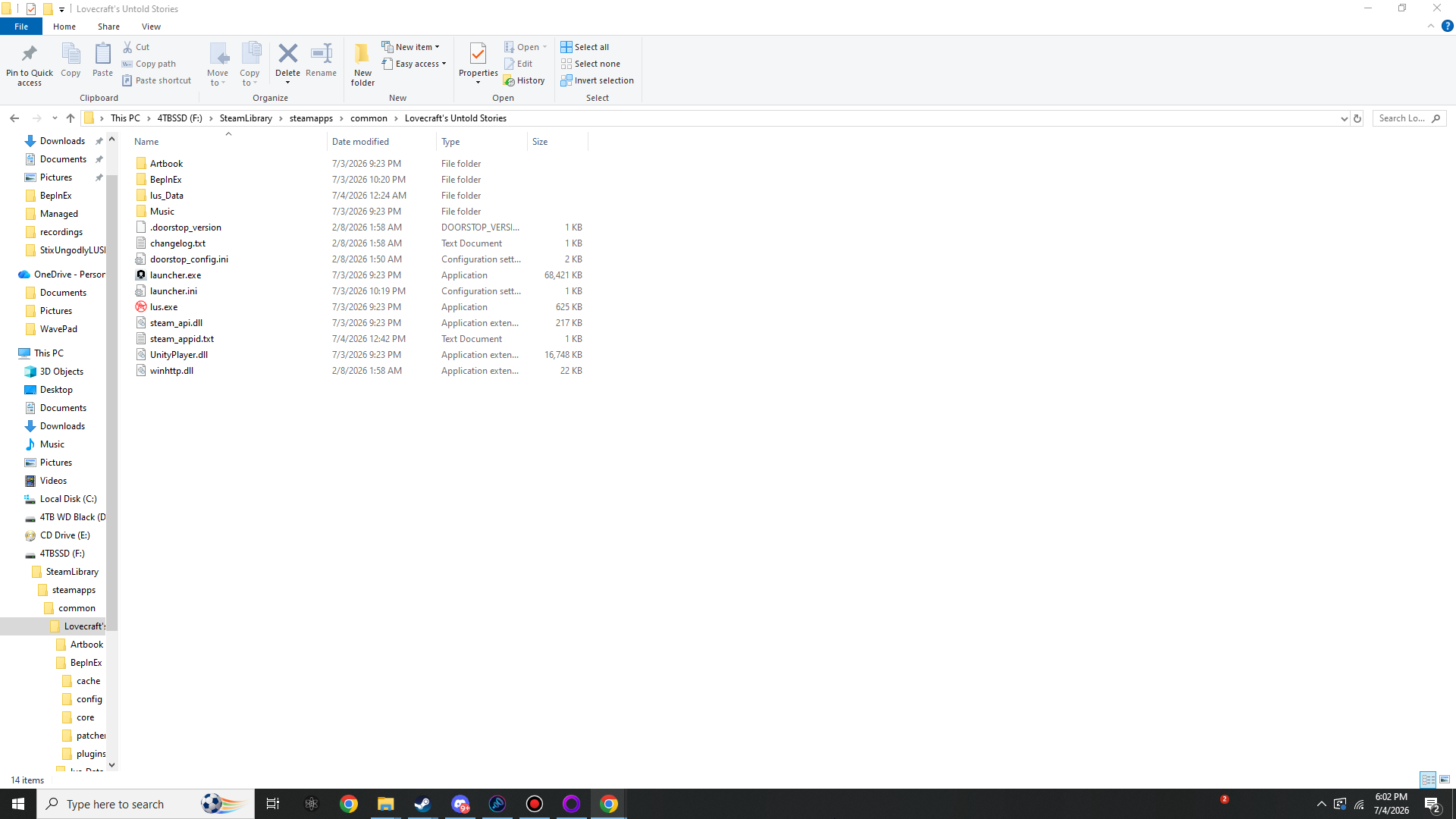
BepInEx folder plus winhttp.dll, doorstop_config.ini, .doorstop_version and changelog.txt sit directly beside lus.exe.
BepInEx\ contains cache, config, core, patchers, plugins and a fresh LogOutput.log.Good to know before the next chapter
The launcher is fine
This game ships both launcher.exe and lus.exe. You do not need to change how you start the game: BepInEx hooks via winhttp.dll inside the Unity process (lus.exe) no matter which door you came through. Keep launching from Steam as normal.
Linux & Steam Deck (Proton)
Under Proton, Windows proxy DLLs are ignored unless you say otherwise. Right-click the game in Steam → Properties → Launch Options and set:
WINEDLLOVERRIDES="winhttp=n,b" %command%Everything else in this manual is identical.
Antivirus false positives
Some scanners dislike any freshly-downloaded winhttp.dll on principle. If yours quarantines it, restore the file and whitelist the game folder — and verify your downloads against the published SHA-256 checksums for peace of mind.