Chapter II — The Watchers
Install the Directors Mod
StixUngodlyLUSDirectors v1.0.0 plants three fully-implemented directors in the dark behind every run — a FAIR AI Director, a Random Generation Director and a FAIR Difficulty Director — all tuned live from a solid in-game panel on F1. It covers the base game and every DLC. This chapter installs it in three minutes; the second half is the field guide to what you just unleashed.
Installation
Step I: Get the archive and open it
Download StixUngodlyLUSDirectors_v1_0_0.rar from the Reliquary (SHA-256 checksum published there). It is a RAR archive — Windows cannot open these natively, so use the free 7-Zip or WinRAR. Inside are exactly two files:
StixUngodlyLUSDirectors_v1_0_0.rar
├── StixUngodlyLUSDirectors.dll          ← the plugin, 78 KB
└── README_StixUngodlyLUSDirectors.txt ← the full manual — keep itStep II: Copy the DLL into BepInEx\plugins
Copy StixUngodlyLUSDirectors.dll into the game's BepInEx\plugins\ folder. Dropping it directly into plugins is the layout shown throughout this manual's screenshots; a subfolder such as BepInEx\plugins\StixUngodlyLUSDirectors\ works equally well, since BepInEx scans subfolders too.
Lovecraft's Untold Stories\
└── BepInEx\
    └── plugins\
        └── StixUngodlyLUSDirectors.dll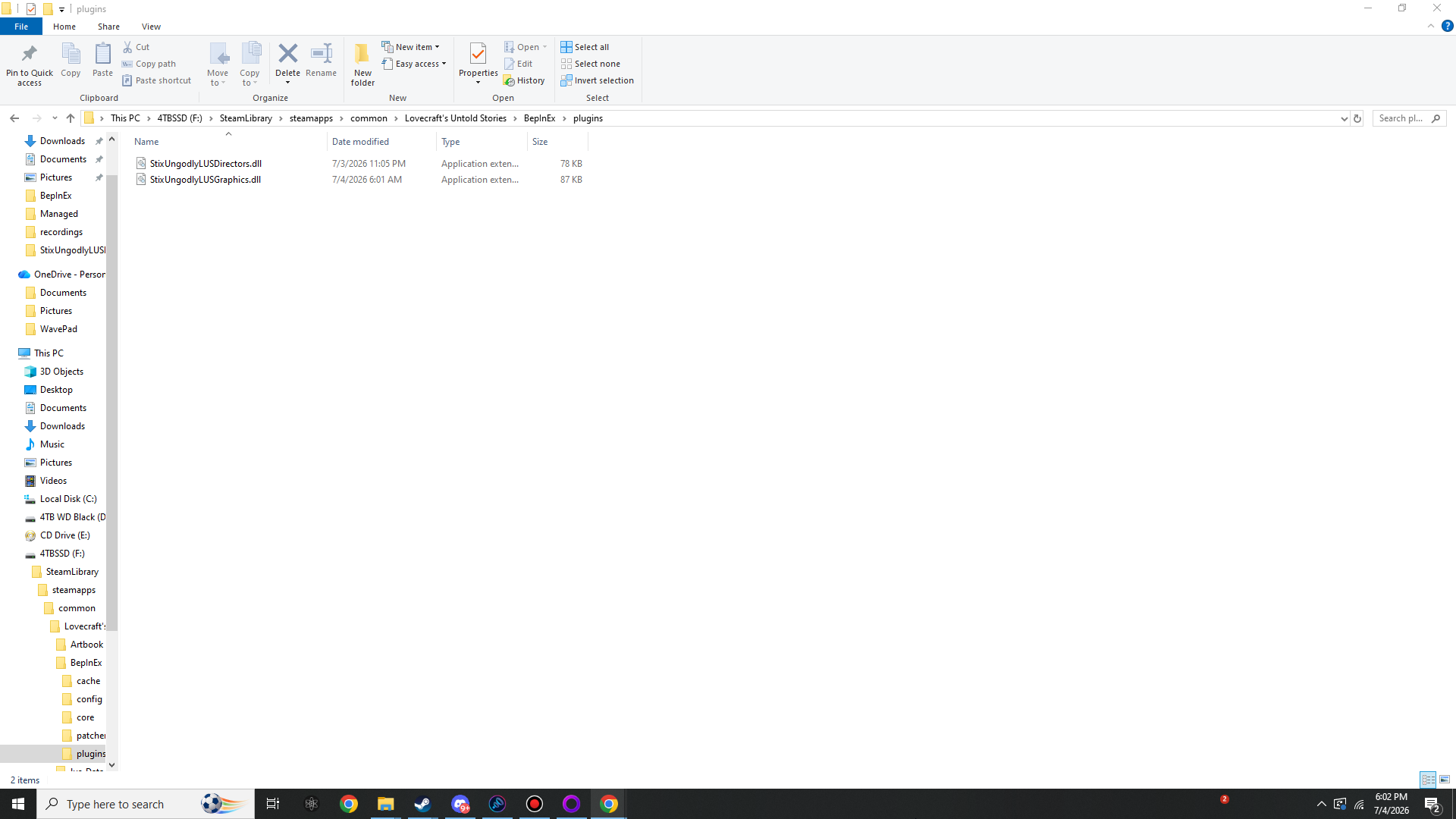
BepInEx\plugins\ holding StixUngodlyLUSDirectors.dll (78 KB) and StixUngodlyLUSGraphics.dll (87 KB). This is the entire mod install.Step III: Launch once and verify
Start the game. Two things happen on this first boot:
BepInEx\LogOutput.loggains the lineStixUngodlyLUSDirectors v1.0.0 by StixsworldHD (StixsmasterHD4k) loaded.together with the number of gated attack states it discovered — 26 on the current game build.- The config file
BepInEx\config\stixsworldhd.lus.ungodlydirectors.cfgis generated (≈25 KB): 79 settings in 10 sections, every one carrying its Min/Max bounds and a GAMEPLAY: line describing the real in-game effect.
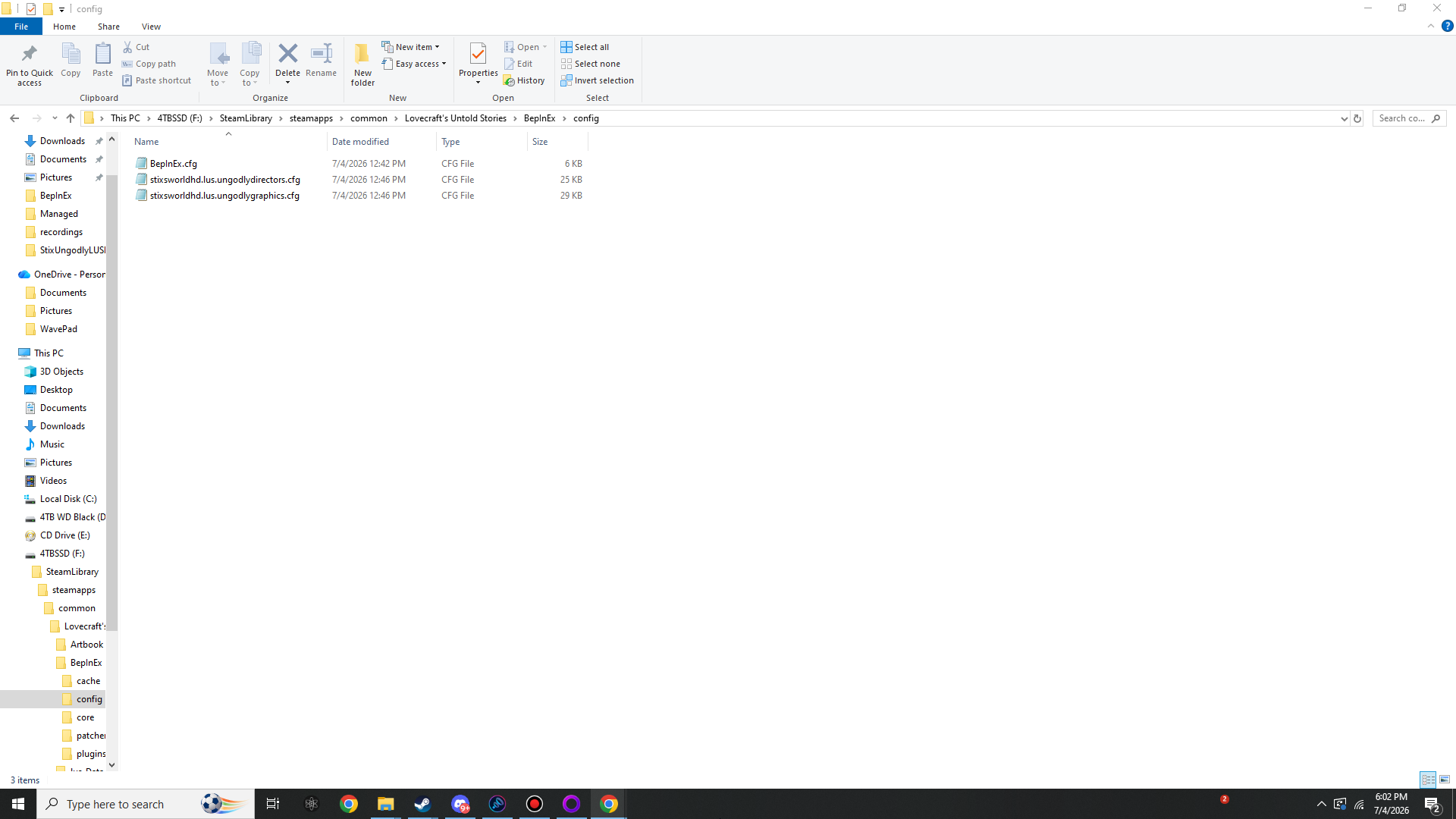
BepInEx\config\ after one launch with both mods installed: BepInEx.cfg, stixsworldhd.lus.ungodlydirectors.cfg (≈25 KB) and stixsworldhd.lus.ungodlygraphics.cfg (≈29 KB).Step IV: Press F1
In game — main menu or mid-run — press F1. The Directors panel opens: a solid, opaque window with seven tabs (AI Director / Fairness / Generation / Loot / Difficulty / DDA / Status). Every slider shows its current value, its allowed range and a plain-English explanation of what it does to your gameplay.
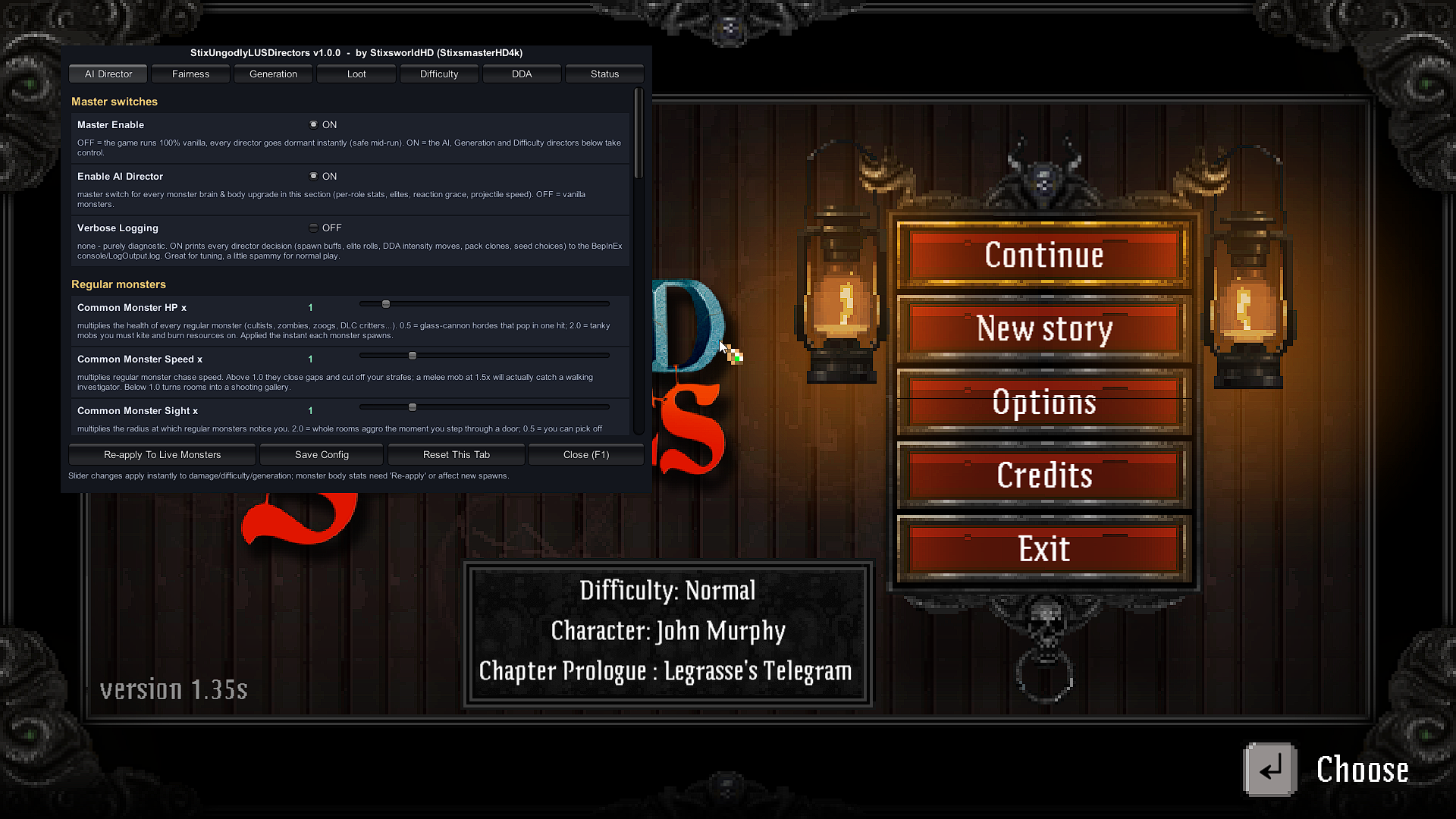
How the panel behaves
- Instant vs. re-apply. Changes to damage, difficulty, DDA, fairness and generation apply the moment you move the slider. Monster body stats (HP, speed, sight…) apply to every new spawn immediately; press Re-apply To Live Monsters to push them onto the room you are standing in.
- Pause Game While GUI Open (default ON) freezes time while you tune.
- Save Config writes to disk on demand; closing the panel auto-saves too.
- Toggle Key is rebindable via the config file if F1 clashes with anything on your machine.
Field guide: the three directors
1 · FAIR AI Director
- Per-role monster shaping, applied the instant anything spawns: HP, chase speed, sight radius, attack speed, attack damage and attack range — tunable separately for regular monsters, mini-bosses and zone bosses, plus enemy projectile speed and turret/nest/trap durability.
- Elites. Any regular monster can roll into an Elite at your chosen chance %, gaining extra HP/damage/speed and appearing bigger with a crimson tint so the threat reads instantly. Bosses never roll — no surprise stat-stacked bosses.
- Fair Attack Slots — the heart of the fairness system. Only a limited number of monsters may actually be mid-attack on you at the same moment (separate melee and ranged caps). Everyone else keeps hunting, flanking and surrounding you: big packs feel terrifying, yet every hit stays readable and dodgeable. This gates all 26 attack behaviours in the game code, covering every enemy family and all DLC creatures automatically (discovered by reflection at load).
- Reaction Grace. The first time a monster spots you it falters for a configurable beat — the human “huh?!” moment — so aggro is always telegraphed, never teleported into your face.
- Room-entry wake delay multiplier: stretch or shrink the built-in “monsters haven't noticed you yet” window when you walk through a door.
2 · Random Generation Director
- Seed control. Force an exact layout seed — share dungeons with friends, practise routes, race identical maps — with optional +1-per-zone so a whole run is deterministic instead of one repeated floor. Seeds are always printed to the log.
- Zone size. Multipliers, flat adds and hard caps for main-path rooms, side rooms, secret rooms and bonus zero-layer set-piece rooms.
- Monster variety. Vanilla picks one themed monster list per zone; Merge-All mode pools every monster the zone can legally host, so cultists, beasts and horrors mix in the same rooms. It reads the zone's own data, so DLC lists merge too.
- Pack multiplier. Rooms spawn cloned pack-mates next to regular monsters (1.5×–5×) under a hard per-room enemy cap. Bosses, turrets, nests, traps and quest specials are never cloned. Pairs beautifully with Fair Attack Slots.
- Money & Knowledge multipliers scale the zone's honest loot budgets, and Loot Quality Bias shifts value toward Rare/Epic chests while conserving the total — fewer, juicier finds instead of mandatory cupboard-smashing.
3 · FAIR Difficulty Director
- Static dials: all damage you deal, all damage you take (health and sanity), a separate boss-damage dial, and flat run-start hero bonuses (max HP / max energy / flat damage — the same stats the in-game difficulty grants).
- Anti-spike caps: no single hit may remove more than your chosen % of max HP, and no single scare more than your chosen % of max sanity. Deaths are earned across a fight, never donated by one overlapping crit.
- Mercy rules: below your HP threshold you take reduced damage and, optionally, the horde drops to a single melee + single ranged attacker — a real, visible, fair escape window when you are bleeding out.
- Dynamic DDA brain: samples your health, sanity, damage-taken rate, deaths and room-clear pace on a smooth interval, blends them into one intensity value, and gently steers damage-in, damage-out, new-spawn HP (never live monsters — that would be cheating), wake delay and bonus attack slots. Assist strength and challenge strength are independently capped by you, movement is smoothed, and the whole brain's state is displayed live in the Status tab. No hidden rubber-banding — you can literally watch it think.
Suggested starting recipes
| Recipe | Settings |
|---|---|
| Fair but fiercer | Common Speed 1.25 · Common Damage 1.25 · Elite Chance 12 · Pack Size 1.5 · keep all fairness defaults |
| Horde mode | Pack Size 3 · Max Enemies Per Room 40 · Common HP 0.7 · Melee Slots 4 · Ranged Slots 3 · Money 1.5 |
| Roguelike marathon | Main Path Rooms ×2 · Side Rooms ×2 · Monster Variety 1 · Use Custom Seed ON + share your seed |
| Story stroll | Player Damage Taken 0.6 · Max Single Hit 40% · DDA Max Challenge 0 · Wake Delay ×2 |
Performance & safety notes
- Idle cost: zero per-frame allocations while the panel is closed; all registries prune on a slow timer; the DDA brain samples every 0.75 s by default.
- The heavy knobs are Pack Size and Max Enemies Per Room (pathfinding scales with crowd size) and extreme zone-size multipliers (longer level builds). Hard caps exist on all of them for a reason.
- Saves are untouched. All changes are runtime-only; asset values that must be tweaked during generation are snapshotted and restored the same frame.
- Escape hatch: Master Enable OFF makes every director go dormant instantly — safe mid-run — and removing the DLL returns the game to 100% vanilla.