Chapter III — The Lantern
Install the Graphics Mod
StixUngodlyLUSGraphics v1.1.0 is the complete graphics control panel this game never shipped, built directly against the game's own rendering systems and verified line-by-line against a full decompilation of the shipped build. Ten sections, 61 settings, one-click presets, all live on F2. Install first; the field guide to every section follows.
Installation
Step I: Get the archive and open it
Download StixUngodlyLUSGraphics_v1_1_0.rar from the Reliquary (SHA-256 published there) and open it with 7-Zip or WinRAR. Inside are exactly two files:
StixUngodlyLUSGraphics_v1_1_0.rar
├── StixUngodlyLUSGraphics.dll          ← the plugin, 87 KB
└── README_StixUngodlyLUSGraphics.txt ← the full manual — keep itStep II: Copy the DLL into BepInEx\plugins
Copy StixUngodlyLUSGraphics.dll into BepInEx\plugins\, right beside the Directors DLL if you installed Chapter II. Directly in plugins (as pictured) or in its own subfolder — both work.
Lovecraft's Untold Stories\
└── BepInEx\
    └── plugins\
        ├── StixUngodlyLUSDirectors.dll   ← Chapter II (optional but recommended)
        └── StixUngodlyLUSGraphics.dll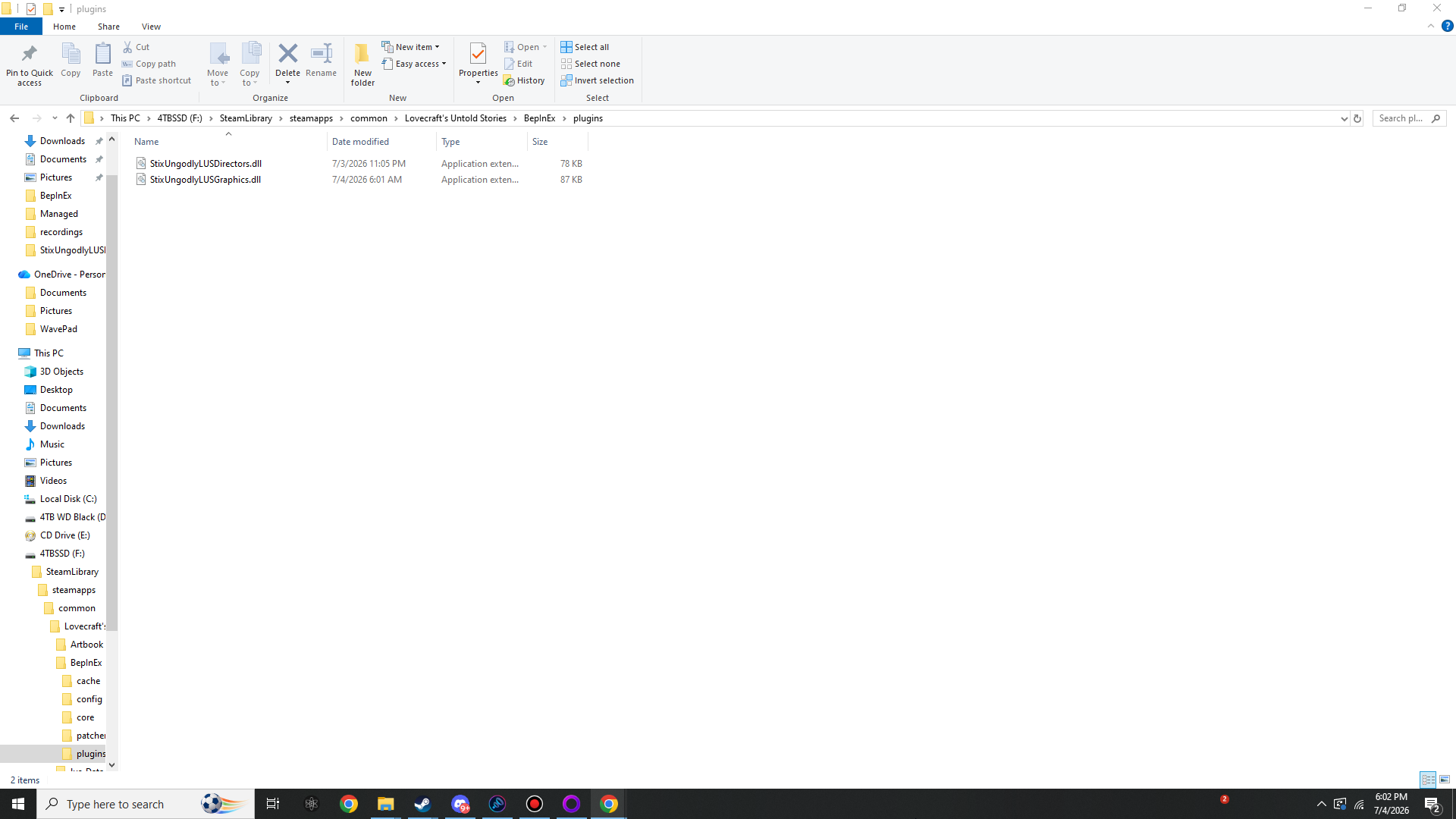
BepInEx\plugins\ holding StixUngodlyLUSDirectors.dll (78 KB) and StixUngodlyLUSGraphics.dll (87 KB). This is the entire mod install.Step III: Launch once and verify
Start the game. On this first boot:
BepInEx\LogOutput.loggains the lineStixUngodlyLUSGraphics v1.1.0 by StixsworldHD (StixsmasterHD4k) loaded. 15 Harmony patches active.- The config file
BepInEx\config\stixsworldhd.lus.ungodlygraphics.cfgis generated (≈29 KB): 61 settings in 10 sections, each with Min/Max bounds and a GAMEPLAY: line. Defaults are pure vanilla — everything ×1.0 / 100%, fog off, post effects off, hidden features off, FPS Cap 60 (the vanilla lock, ready for you to break).
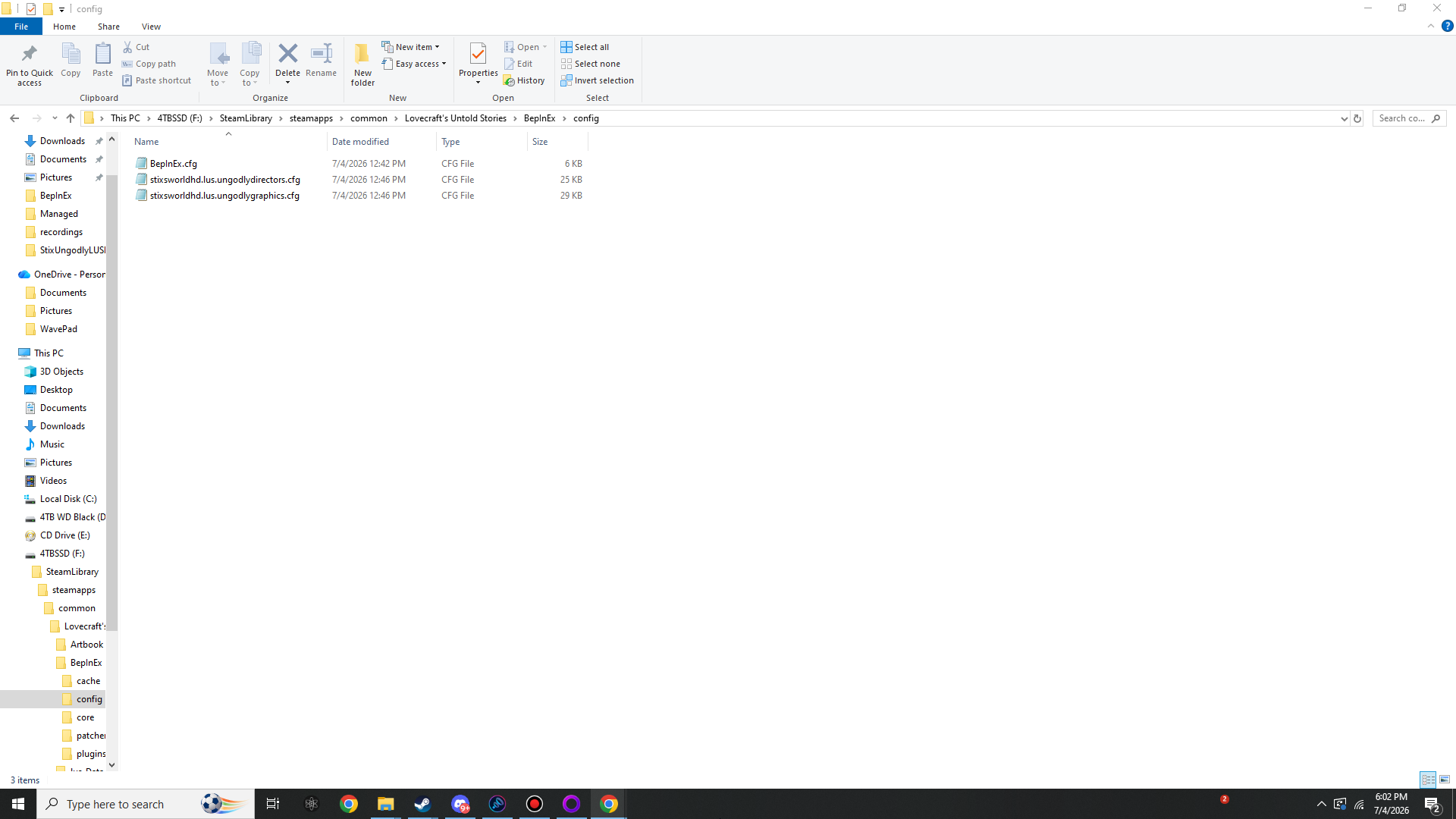
BepInEx\config\ after one launch with both mods installed: BepInEx.cfg, stixsworldhd.lus.ungodlydirectors.cfg (≈25 KB) and stixsworldhd.lus.ungodlygraphics.cfg (≈29 KB).Step IV: Press F2
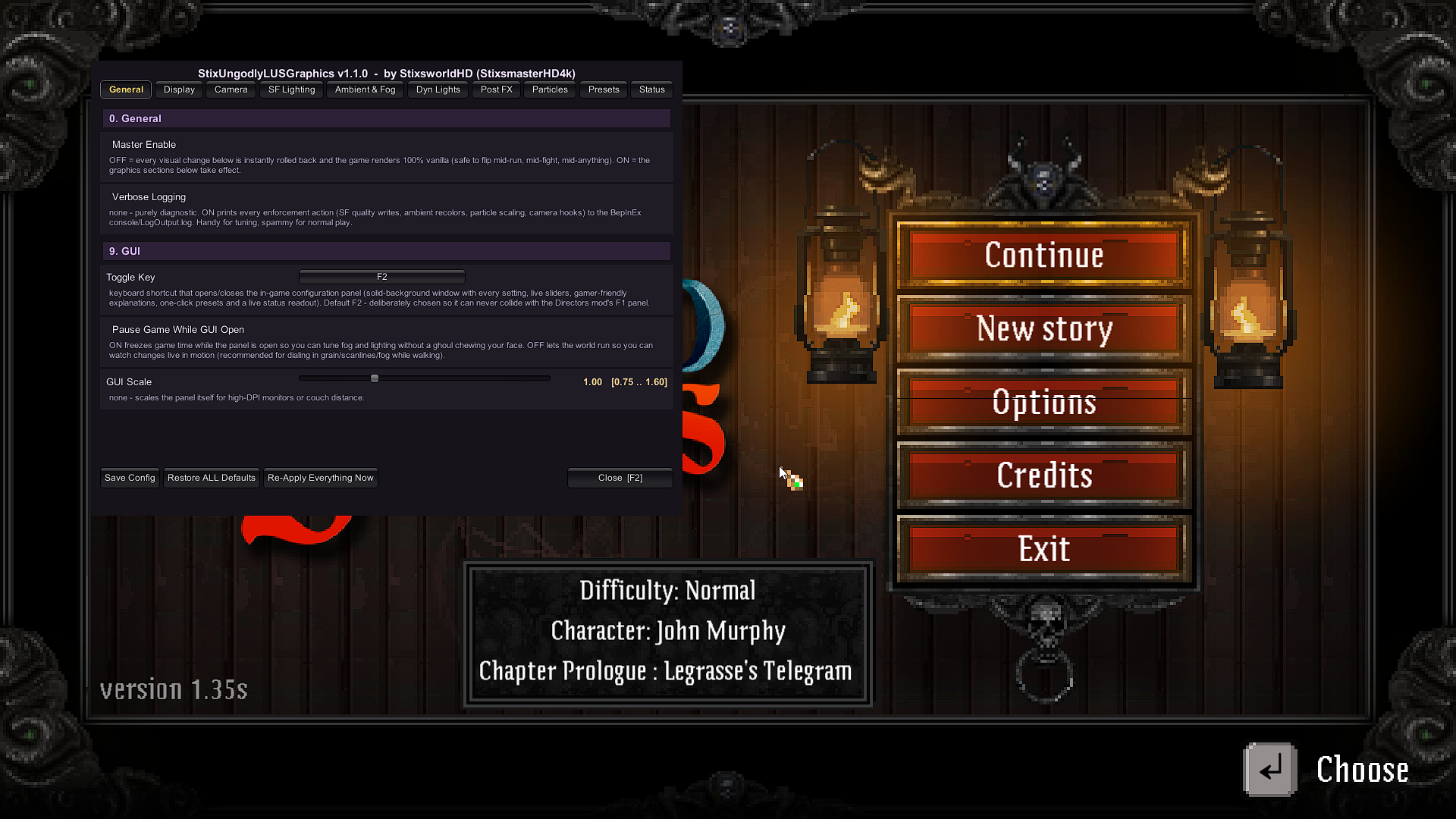
In game, press F2 — deliberately chosen so it can never collide with the Directors panel on F1. Ten tabs appear: General / Display / Camera / SF Lighting / Ambient & Fog / Dyn Lights / Post FX / Particles / Presets / Status. Everything applies instantly — lighting sharpness, fog, grading, particles, the FPS cap — live, mid-run.
Field guide: the eight graphics sections
1 · Display & framerate
- Breaks the hardcoded 60 FPS lock the game applies to every PC at startup: cap anywhere from uncapped to 1000 FPS for high-refresh monitors. Game logic is delta-timed — nothing plays faster, it only looks smoother.
- VSync override (Off / On / Half-refresh) on top of the game's own toggle, driver frame-queue control for input-latency tuning, run-in-background, and a switch for the FPS counter that ships hidden inside every copy.
2 · Camera & view
- Pixel-perfect zoom ladder offset (−4…+4): zoom out for tactical awareness or in for claustrophobia, sprites staying razor crisp; plus a smooth FOV multiplier (0.60×–1.60×) for continuous framing — at 1.0 the vanilla pixel-perfect math stays byte-identical.
- Pixel-Perfect Camera Snap quantises the camera to the 32 px/unit art grid after follow/shake/zoom run, killing diagonal-walk sprite shimmer.
- Unlocks the developers' own live Numpad + / Numpad − / Enter zoom keys for normal play, plus camera follow-speed and zoom-transition-speed multipliers.
- Screen Shake 0–300% — the motion-sickness accessibility slider the game never had (0 = fully off), or triple it if you like your explosions felt.
3 · SF Lighting quality (the game's signature 2D soft-shadow renderer)
- Light Map Scale and Shadow Map Scale divisors exposed (vanilla PC: 8 / 4). Drop them to 2–4 / 1.5–2 and torch glows and cast shadows go from soft blobs to crisply defined light — the single biggest visual upgrade available. Raise them to 16–32 and weak GPUs gain serious FPS (cost scales with the square of these numbers).
- Master toggle for 2D soft shadows, light penetration into casters, shadow-seam compensation, linear vs. soft light blending, and Global Light Exposure — one dial that multiplies every 2D light at once.
- HDR Lighting force-on switches the light map to a high-precision format and visibly reduces the banding rings around torches and glow effects.
4 · Ambient, mood & fog
- Ambient Brightness multiplier + Black Lift, applied live on top of every room's hand-authored ambient colour — re-applied on each room change through the game's own path, so per-room mood authorship survives.
- Colour Temperature and Green–Magenta Tint: full white-balance of the world, plus an engine-ambient multiplier stacking on the vanilla Brightness slider.
- The dormant fog layer. The game ships a complete 2D volumetric-style fog system — colour, strength, light-scatter glow, shadow-carved scatter — with its shader in every copy. The developers just never turned it on. This plugin does. Fog Strength 0.10–0.25 + Scatter 0.8 + Shadow Mix 0.7 makes torches bloom halos through drifting murk with shadow shafts cut through them.
5 · Dynamic lights (hidden dev feature)
- Unlocks the finished-but-disabled normal-map lighting system (the
p_normalMapswitch buried in the dev console): real engine point lights shade surfaces with genuine 3D depth as light moves past — with intensity and range multipliers once unlocked. - Player Light brightness and radius multipliers: literally see further into the dark. Hooks the same pristine values the game's own sight-items scale, so item bonuses still stack on top exactly like vanilla.
6 · Colour grading & Post FX (shader-independent — can never pink-screen)
- Brightness/Gamma: positive values use a soft screen-blend lift that brightens shadows without clipping whites; negative crushes to black.
- Permanent cinematic Vignette (+corner blur, +blur spread) driven through the game's own high-quality vignette shader that vanilla only flashes during madness — the madness effect keeps 100% ownership of its pulse.
- Baseline Chromatic Aberration for a constant anamorphic-lens fringe; Madness Aberration % scales — or fully disables, for accessibility — the sanity-break pulse itself.
- Animated Film Grain (1–4 px), CRT Scanlines (1–4 px) and cinematic Letterbox Bars — generated at runtime from tiny procedural textures + Unity's always-included blend shader. The HUD draws above the bars.
- When every post setting sits at neutral, the whole pass self-removes from the camera: a true zero-cost vanilla render path.
7 · Texture & filtering
- Sprite Filtering force: Point (razor retro pixels), Bilinear or Trilinear — applied live to every loaded texture with per-texture originals remembered (fonts excluded so text stays clean), fully reversible.
- Texture Quality (Full/Half/Quarter/Eighth) for VRAM-starved machines, Anisotropic force, and MSAA 0/2/4/8 for rotated-sprite edges.
8 · Effects & particles
- Particle Density 10–300%: every blood spray, muzzle flash and gib count, scaled per-system with originals cached — 100% restores vanilla exactly.
- Particle Hard Cap: an emergency per-system ceiling so worst-case effect pileups can never tank your frame rate, even at 300%. Plus Soft Particles force, Particle Raycast Budget and Pixel Light Count.
The Presets tab — one-click looks
| Preset | What it does |
|---|---|
| Pure Vanilla | Everything back to shipped defaults. |
| Cinematic Horror | Cold scattering fog, crisp lights, vignette, grain, subtle letterbox. The launch-trailer look. |
| Crisp Retro CRT | Point-filtered pixels, grid-snapped camera, scanlines. |
| Deep Dark Delve | True darkness, bigger lantern, heavier shadows. |
| Maximum Fidelity | Every quality dial to the wall + 240 FPS cap. |
| Potato Rescue | Chunky maps, half textures, capped particles: FPS. |
| Silky Competitive | Uncapped, VSync off, 1-frame queue, 40% shake, no film. |
Suggested starting recipes
| Recipe | Settings |
|---|---|
| Just make it smoother | FPS Cap 144 (or your panel's Hz) · VSync Override 1 · Max Queued Frames 1. Done — the game you had, minus the 60 FPS ceiling. |
| Sharper everything | Light Map Scale 4 · Shadow Map Scale 2 · HDR 1 |
| Innsmouth at night | Fog Strength 0.20 · Fog RGB 0.50/0.62/0.75 · Scatter 0.9 · Shadow Mix 0.7 · Ambient ×0.8 · Temperature −20 · Vignette 2.0 · Grain 8 |
| My eyes, the shaking | Screen Shake 0 · Madness Aberration 0. Both fully off = the accessibility pass the game never shipped. |
| I can't see anything | Ambient Black Lift 0.08 · Player Light Radius 1.5 |
Performance, safety & compatibility
- Idle cost is effectively zero: no per-frame allocations, no polling. Registries refresh only on the game's own room-change call; a 1 Hz tick re-asserts a handful of engine values by comparison. The post-FX pass detaches itself whenever brightness / grain / scanlines / bars are all neutral.
- The heavy knobs: Light/Shadow Map Scale pushed toward 1 (cost rises with the square), MSAA 8, and Particle Density 300 in crowded fights. The Status tab's live frame-time readout is right there while you experiment; potato levers are map scales up, Texture Quality down, Particle Density down + Hard Cap.
- Verified hooks: every hook was resolved against the real shipped assemblies by an automated 72-point verification — all 15 patch targets plus every reflected field — not guessed from documentation. All shader work uses only shaders guaranteed present in every copy, so nothing here can ever pink-screen from a stripped shader.
- Companion by construction: zero shared Harmony patch targets with the Directors mod — Directors patches the enemy/generation/damage pipeline, this patches only rendering, camera and graphics-settings methods. Directors' pack-size hordes and this plugin's Particle Density coexist untouched. Run both.
- DLC-proof & save-safe: hooks target the universal camera, renderer, zone-manager and quality systems every zone flows through; every touched value is snapshotted first. Master Enable OFF (or removing the DLL) restores 100% vanilla instantly — textures, particles, lights and the player lantern included — and the vanilla options menu keeps full authority underneath.
Changelog
v1.1.0
- The hardware mouse cursor is now forced visible and unlocked for the entire time the F2 panel is open (previously the game's always-hidden cursor + gameplay pointer-lock could leave you with no usable pointer over the panel). State is snapshotted on open, enforced every frame so nothing the game does can re-hide or re-lock it mid-session, and on close control is handed back through the game's own input state machine (with a snapshot fallback) — keyboard, gamepad and menu contexts all restore their exact vanilla cursor behaviour.
- No other behaviour, setting, default or patch target changed. Config files from v1.0.0 are fully compatible as-is.
v1.0.0
- Initial release: 61 settings across 10 sections, F2 panel, 7 presets, 15 Harmony patches, full snapshot/restore vanilla safety.